



In 2025, 69% of content marketers followed a documented content strategy, according to Zebracat's 2025 content marketing statistics compilation. Yet when I step in to rebuild a stalled content program, that "documented strategy" is almost always a spreadsheet of blog titles and publish dates. It tells writers what ships on Tuesday, not who the page serves, what action it has to trigger, or when the team should delete it.
Developing a content strategy that moves pipeline means treating it as a decision system, not an editorial calendar. Every page needs a named audience problem, a single commercial job, and a threshold that decides whether it stays live or gets retired. That aligns with Google's guidance on creating helpful content, which defines people-first content as material built primarily to help users rather than manipulate search rankings.
There's also a newer tradeoff most strategy guides ignore. Traditional organic traffic isn't the only game anymore, because AI-generated search summaries siphon clicks away from informational queries while rewarding source-worthy pages with citations. If you don't separate pages built to earn citations from pages built to convert clicks, you'll measure the right work against the wrong numbers.
Tabla de contenido
- The Six Steps and What Each One Produces
- Research the Audience Before Setting Anything Else
- Set Goals for Each Stage of the Buyer Journey
- Plan Topics From Search Demand and Intent
- Plan for AI Answers Alongside Rankings
- Measure Outcomes and Set Review Thresholds
- Run Your First Strategy Review This Month
The Six Steps and What Each One Produces
Look at the gap between owning a plan and getting results from it. In the 2025 Content Marketing Institute and MarketingProfs B2B research surveying 1,186 global marketers between June and August 2024 (including 980 B2B marketers answering strategy questions), 95% of B2B marketers reported having a content strategy, yet only 29% rated it extremely or very effective. Another 58% called it moderately effective, 12% rated it not very effective, 1% said it wasn't effective at all, and only 22% considered their overall content marketing extremely or very successful.
Format habits show the same disconnect between busyness and impact. Short articles or posts were used by 92% of respondents, yet only 43% ranked them among the most effective formats, trailing video at 58% y case studies at 53%. Teams publish whatever is easiest to ship instead of what solves the buyer's problem.
That gap tells me teams don't lack calendars. They lack explicit objectives and decision rules. Here's the six-step process I use to turn a blank document into a working system, along with the concrete output and my realistic time estimate on a small team.
| Paso | Output | Typical time (my estimate) |
|---|---|---|
| 1. Research the audience | Problem statement per audience segment | 1-2 weeks |
| 2. Set goals per page stage | One target metric per asset type | 1-2 days |
| 3. Plan topics from demand and intent | Prioritized topic map with primary assets | 1 week |
| 4. Plan for AI answers | Citation and click plan per topic | 2-3 days |
| 5. Measure outcomes and set thresholds | Metric set with keep, update or retire rules | 1 day |
| 6. Run the first review | Dated decision list | Half a day per quarter |
Why the Order Matters More Than the Calendar
Skipping straight to step three is the fastest way to burn a quarter's budget. If you pull keywords before validating audience problems and page-level goals, you end up with a tidy calendar full of topics nobody in sales can use. For a broader look at how these planning phases fit together across channels, Outrank's content strategy roadmap for marketers lays out the full planning sequence well.
Every artifact in the table feeds the next one. Problem statements narrow your keyword pulls, stage goals lock in the page format, and review thresholds stop dead pages from piling up on your domain.
The one-line strategy test: Point to any planned URL and ask if you can name the exact reader, the single job of the page, and the number that decides whether it stays live after launch. If you can't answer all three in one breath, you have a publishing schedule, not a strategy.
Research the Audience Before Setting Anything Else
Most content sprawl starts with internal brainstorming. Someone in marketing guesses what buyers care about, the team ships twenty blog posts, and six months later nobody understands why rankings stall and pages cannibalize each other. In the 2025 Content Marketing Institute enterprise content marketing research, 81% of extremely or very successful enterprise marketers attributed their success to understanding their audience, while only 28% of enterprise marketers overall rated their strategy extremely or very effective.
I prevent sprawl with a hypothesis-and-refresh workflow. Instead of writing generic personas like "VP of Marketing at a mid-market SaaS company," I force every content bet to start with a narrow, testable problem.
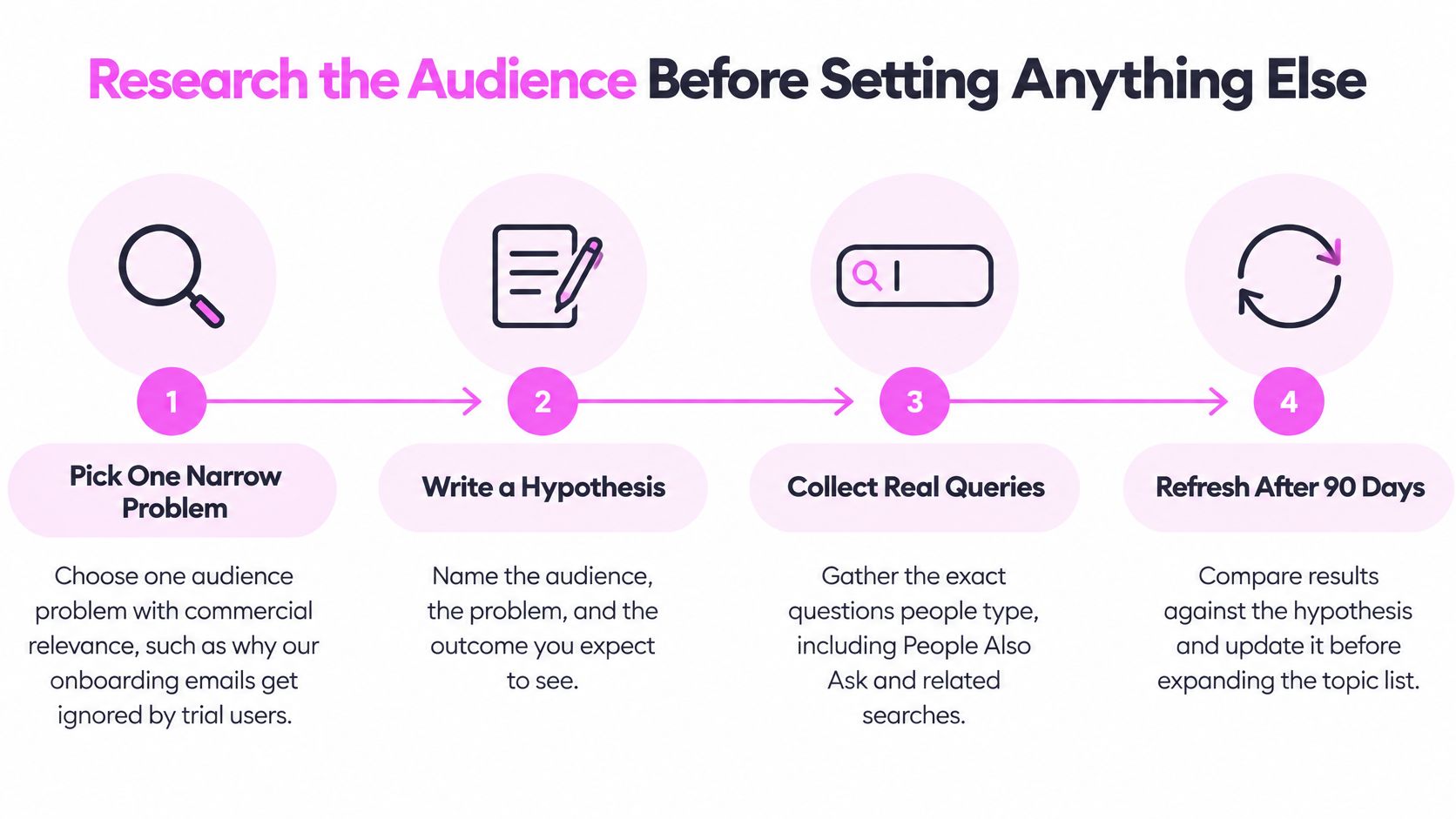
The flowchart below maps the four stages of this pre-production research loop before a single topic enters the backlog.
The Four Research Moves
Pick one narrow audience problem with commercial relevance. "SaaS marketers" isn't a problem; "why our onboarding emails get ignored by trial users" is. Choosing a narrow pain point tied to what your product solves keeps you from chasing vanity top-of-funnel traffic that never buys. The common mistake here is picking a broad category term because its monthly search volume looks impressive in a spreadsheet.
Validate the problem across four real data sources. Before I approve a brief, I run at least five customer interviews, scan recent sales call transcripts and Zendesk or Intercom support tickets for repeated phrasing, check internal site search logs, and inspect the live Google search results to see what intent currently ranks. Interviews tell you the emotional friction, support tickets give you exact customer language, and the live SERP shows whether searchers want a tutorial, a template, or a vendor comparison. Relying on your team's internal assumptions instead of support tickets guarantees you'll use company jargon nobody searches.
Build one authoritative primary asset before multiplying formats. Answer the problem thoroughly on one canonical URL. Add a secondary format only when it serves a different consumption context, such as a one-page PDF checklist a rep can share during a discovery call or a short walkthrough video embedded inside the guide. Teams get burned here when they chop one thin idea into four overlapping blog posts and split their own ranking signals.
Lock in the expected outcome and observation window before launch. Write down what success looks like and how long you'll wait to judge it, typically 90 días for an established domain. Without a pre-launch hypothesis, teams move the goalposts after publication and rationalize weak content as "brand awareness."
Turning Research Into a Thirty-Second Problem Statement
Once those four moves are done, distill the findings into one crisp problem statement per audience segment that any writer can read in thirty seconds. For example: "Operations managers at 20-to-100-person agencies lose billable hours chasing timesheet approvals every Friday, search for automated reminder workflows, and need proof that a tool integrates with Slack before booking a demo." That single sentence tells the writer who's reading, what hurts, and what proof earns the click.
If you want to see how audience interviews and live query analysis translate into a practical content plan, this short walkthrough breaks down the process clearly.
Set Goals for Each Stage of the Buyer Journey
"Grow organic traffic" isn't a goal. It's a wish that lets every department argue over whether a page worked. In Content Marketing Institute's 2025 technology marketing research covering 274 respondents, 96% reported having a content strategy, yet the most common cause of weak performance was a lack of clear goals, cited by 44%. The same survey found 47% struggled with cross-team alignment and 43% struggled with buyer-journey alignment.
I assign every page to one buyer-journey stage before a writer opens a draft. One stage means one job, and one job means one primary metric.
| Page stage | Job of the page | Metric to target | Example asset |
|---|---|---|---|
| Conciencia | Answer a broad question | Qualified organic visits, assisted conversions | Guide to content audits |
| Consideración | Compare options | Demo or trial starts from the page | Tool comparison page |
| Decisión | Remove the last objection | Conversion rate to a sales conversation | Pricing and implementation FAQ |
| Post-purchase | Help users succeed | Activation rate or support tickets avoided | Setup walkthrough |
Matching Each Stage to One Real Page
An awareness page, like a guide to running content audits, earns its keep by attracting qualified organic visits from your target audience and contributing to assisted conversions down the line. Judging that page on same-session demo requests will make you kill useful top-of-funnel work prematurely.
A consideration page, such as a head-to-head tool comparison, sits much closer to revenue. Searchers already know they have a problem and are shortlisting vendors, so I measure demo or trial starts originating directly from that URL. If traffic climbs while trial starts sit flat, your positioning or call to action is weak.
Decision pages exist to clear final procurement or technical objections, like a pricing and implementation FAQ. Traffic volume is usually tiny here, and that's fine. What matters is the conversion rate from that page to a booked sales conversation.
Post-purchase guides, like an initial setup walkthrough, rarely get credit in marketing dashboards, yet they protect retention. Track product activation rate or the drop in repetitive support tickets on that feature. If your team hasn't mapped these touchpoints yet, MD TECH TEAM's guide to customer journey maps for small businesses offers a straightforward structure for plotting buyer questions against each stage.
Fixing Alignment and Handling Brand-New Sites
Cross-team friction usually happens because sales expects pipeline next week while marketing celebrates session growth. My fix is blunt: put the goal table on one single page and get both the sales lead and the content lead to sign off on the exact metric and 90-day target for each page type before production begins. If a stakeholder can't agree to a number, the topic goes back on the shelf.
A brand-new site is the one major exception to conversion-first targets. When a domain has almost no authority or traffic, setting demo targets for month two only creates statistical noise; target clean indexing and early impressions first, then graduate to conversion metrics once qualified visitors arrive.
The output of this step is a signed one-page goal statement per asset type, pairing its stage, named metric, and 90-day target.
Plan Topics From Search Demand and Intent
Once you know the audience problem and the page's commercial job, you're ready to map topics. I never start from a giant keyword dump sorted by search volume. Volume tells you how many people typed a phrase; it doesn't tell you whether Google rewards a blog post, a product page, or a calculator for that phrase.
Mapping demand into clean clusters takes a workspace where search data, live results, and page roles sit side by side.

Five Steps From Audience Problem to Topic Map
Pull real queries from each audience problem. Start with the phrasing from your interviews and tickets, then expand it using Google Search Console, autocomplete, La gente también pregunta boxes, and related searches. If you want a deeper breakdown of how to filter raw query exports into usable briefs, walk through our guide on how to do keyword research for content marketing.
Cluster queries by the single page that should answer them. Group every phrase that shares the same underlying user intent into one topic cluster, assigning exactly one primary URL per cluster. Never publish five near-duplicate posts chasing slight phrasing variations like "content audit checklist," "website content audit steps," and "how to audit blog content." All that does is split internal links and confuse search engines about which URL deserves to rank.
Inspect the live SERP before choosing a format. Open an incognito window and check the top ten organic results for the cluster's head term. Say you run a B2B consulting service and want to rank for a software-adjacent term, but the live SERP is packed with interactive product comparisons and G2 listings. Writing a long educational guide won't crack page one; either change the format to match buyer intent or pick a different cluster.
Mine competitor domains and keyword gap reports. Run a domain gap comparison against two or three direct peers to find clusters where competitors rank with thin, outdated, or overly generic pages. Beating an abandoned article from four years ago is far faster than fighting a domain with thousands of links on a saturated head term.
Score every cluster on three criteria. Rate each cluster from one to five on audience fit, commercial relevance, y ranking realism given your current domain strength. Sort by total score, not search volume, so your team writes the highest-priority pages first.
A Worked Example Merging Three Queries and Splitting One
Say a project management platform finds four queries around agency capacity planning: "agency resource planning guide," "how to calculate agency team capacity," "resource utilization formula for agencies," and "best resource planning software for agencies."
The first three queries share informational, how-to intent. A single primary guide covering capacity math, utilization formulas, and planning workflows should target all three, keeping internal authority concentrated on one URL.
The fourth query, "best resource planning software for agencies," carries commercial comparison intent. Trying to jam a software comparison table into the bottom of the how-to guide weakens both pages. Split it into its own dedicated consideration asset targeting demo starts.
At the end of this step, you should hold a prioritized cluster map listing every planned URL, its target primary query, its secondary queries, and its required format.
Plan for AI Answers Alongside Rankings
Conventional SEO assumes a straight line from ranking to click to conversion. That line broke for informational searches. A field experiment documented in a StackCyber analysis of Google AI Overviews found that when an AI Overview appeared, outbound organic clicks dropped by 39.8% and zero-click searches jumped by 34.5%. A separate analysis in the same report examining 3,119 informational and educational queries across 42 organizations showed organic click-through rate on AI Overview queries falling from 1.76% in June 2024 to 0.61% in September 2025.
When clicks drop by more than half on informational queries, judging every article strictly on organic sessions sets your team up to panic and abandon good work. At the same time, slapping an "AI optimization" checklist onto every draft misses the strategic choice.

Choosing Between Citations, Demand, and Direct Conversion
Before assigning a topic, decide which of three distinct objectives it serves. Don't try to force one page to do all three.
- Earning citations in AI answers: Build these pages when an AI summary will answer the core question on the results page. To get cited, publish distinctive first-party data, original benchmarks, and clear, sourced definitions that answer engines can quote cleanly without hedging. Commodity summaries rewritten from the top five search results rarely earn citations because the model already has that phrasing from ten other domains.
- Generating demand after exposure: When a buyer sees your brand cited in an AI Overview or ChatGPT answer, they often skip clicking the informational link and search your brand name later. Capture that delayed demand with crisp branded comparison pages, honest customer case studies, and implementation breakdowns that prove you're the safe choice once they arrive.
- Converting users who skip generic summaries: Interactive calculators, templates, diagnostic tools, and deep configuration walkthroughs deliver utility an AI summary can't replicate in two paragraphs. Build these when the user must interact with your site to get an answer specific to their numbers.
Conventional search traffic still wins outright on transactional and commercial-intent queries, like pricing lookups, vendor comparisons, and category buyer searches. For those terms, a click remains the primary path to pipeline, so optimize hard for rankings and conversion rate rather than chasing citations.
Measuring Citations Without Mistaking Mentions for Revenue
Tradeoff to watch: AI visibility isn't revenue. If a glossary page racks up citations every week while branded searches and pipeline stay flat, you've built a free textbook for the search engine, not a growth asset.
To keep citation work honest, track three signals alongside standard organic visits: branded search volume for the core topic over the 90-day window, the count of target queries where your URLs appear as cited sources in AI Overviews, and direct referrals from pages or communities mentioning your brand. If you need a system for auditing those brand mentions and cited URLs at scale, our breakdown of visibilidad de búsqueda por IA más amplia explains how to track them alongside classic rankings.
Citation counts alone never justify keeping a page in my review doc. I only renew or expand a citation-focused asset if at least one of those three demand signals moves inside the 90-day observation window. Your output here is a per-topic objective tag (citation, demand, or direct conversion) paired with the exact signal that validates it.
Measure Outcomes and Set Review Thresholds
Pageview reports are the easiest way to hide a failing strategy. A blog post pulling five thousand visits a month looks great in a slide deck until you notice visitors bounce in twelve seconds and zero readers ever touch a product page. Traffic without downstream business impact is just server cost.
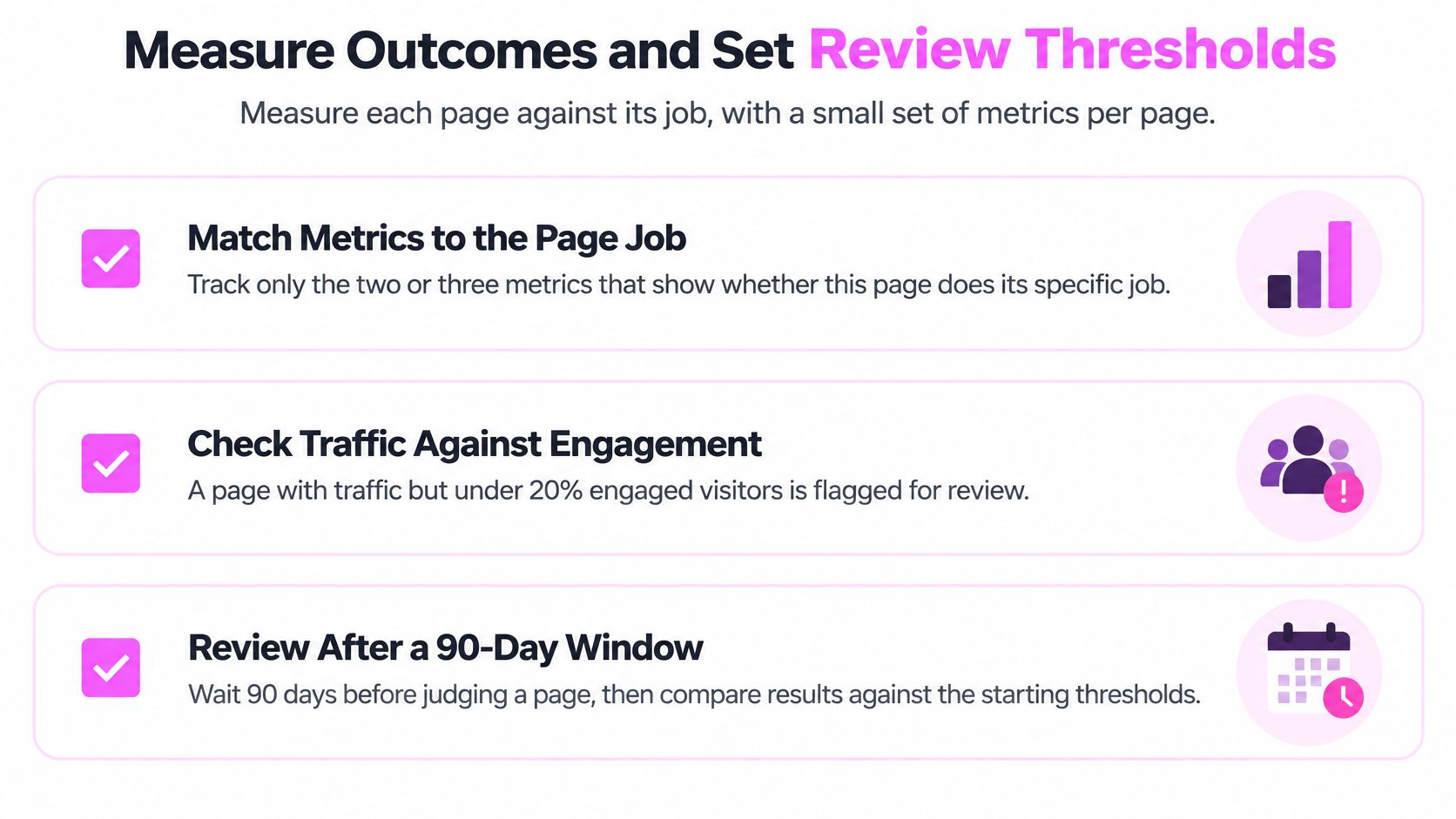
I judge every page strictly against the job we assigned it in the goal map, using a tiny metric set of two or three numbers per URL. I also agree on review thresholds with the team before publishing anything, so nobody argues emotionally about keeping a favorite pet post alive.
The checklist below summarizes the three-step evaluation discipline I apply at every review cycle.
Starting Thresholds After 90 Days
Treat these numbers as starting points to calibrate against your own historical baseline, not rigid universal laws. Wait a full 90-day observation window after publishing or updating a page before triggering an action, so search engines have time to test the URL and settle rankings.
| Señal | Starting threshold | Acción |
|---|---|---|
| Traffic without engagement | Under 20% engaged sessions | Check intent match, then rewrite the intro |
| No progression to next step | Under 5% click-through to goal page | Rewrite headings and CTA |
| Competing pages for one query | Two or more URLs ranking for it | Consolidate into the stronger page with a 301 redirect |
| No impressions or citations | Zero after two review cycles | Retire or merge the page |
Notice the specific order of diagnosis on that first row. When a page earns clicks but suffers under 20% engaged sessions, don't immediately rewrite all two thousand words. Check whether your title promised something the intro failed to deliver, or whether the live SERP shifted intent away from your format.
One important qualification on the second row: the 5% click-through threshold applies only to pages past the 90-day window that sit at a stage where a next-step link exists. Pages without a goal link, such as standalone post-purchase setup docs, are judged strictly on their downstream metric, like activation lift or ticket deflection.
Keeping Attribution Honest Across Review Cycles
Good measurement falls apart when reviews only happen after a bad quarter. I lock in three distinct cadences so maintenance stays manageable:
- Monthly engagement check: Scan top traffic pages for sudden drops in engaged sessions or SERP intent shifts so you catch problems early.
- Quarterly cluster review: Evaluate every cluster against its downstream goal metric, consolidate cannibalizing URLs with 301 redirects, and refresh high-potential pages sitting on page two.
- Annual retirement pass: Prune or merge dead pages that earned zero meaningful impressions and zero citations across two consecutive review cycles.
Your output from this step is a written threshold table pinned inside your team workspace before the next brief gets assigned.
Run Your First Strategy Review This Month
You don't need a six-week offsite to fix a stalled content program. You can install the backbone of this decision system in five focused days by giving each day one clear owner and one concrete deliverable.
Your Five-Day Implementation Schedule
- Monday (Content lead): Pull five customer interviews or ten recent support tickets for one high-value audience segment, then write its problem statement as a single sentence a writer can read in thirty seconds.
- Tuesday (Content lead and revenue owner): Bring your stage goal map to whoever owns pipeline or revenue and get a signed goal and named metric for every page type. Reject any goal that doesn't contain a number.
- Wednesday (SEO lead): Export your top twenty queries from Google Search Console and internal site search, group them into clean topic clusters, and mark one primary asset per cluster. When turning those clusters into writer-ready outlines, we use SemDash to create content briefs with integrated AI based on actual SERP data, and newer team members can ramp up quickly using SemDash's SEO Academy video tutorials on SEO strategies and how to use SemDash tools.
- Thursday (Content lead): Pull engagement and progression numbers for every existing URL inside those clusters, then apply your threshold table to tag each page as keep, update, consolidate, o retire.
- Friday (Team lead): Book a thirty-minute review meeting four weeks out and publish the signed threshold table in your team's central workspace before approving a single new draft.
The first week only changes what you publish next. The recurring quarterly review is what decides whether your team compounds its wins or slides back into filling an empty editorial calendar.
Turning a content strategy into a repeatable decision system gets much easier when your keyword clusters, live SERP intent, competitor content gaps, and AI Overview citations live in one workspace instead of five spreadsheets. SemDash brings together 20+ SEO research tools, SERP-backed AI content briefs, and URL-level tracking so you can prioritize pages that earn both clicks and citations. Explore the full toolkit and start mapping your next quarter's clusters at SemDash.